How to Document Browser and OS Deprecations Without Causing a Support Crisis


It is a Tuesday morning, and the support queue is suddenly full of angry messages from users who cannot log in. The engineering team dropped support for Internet Explorer 11 at midnight, exactly as planned. The code works perfectly. The problem is that the users did not know it was happening.
Version deprecation forces a choice on your users. They have to upgrade their software, replace their hardware, or abandon your product entirely. It is a high-stakes operational change, but it is often treated as a minor technical footnote. When a deprecation is documented poorly, it creates escalations, negative reviews, and churn. When it is documented well, it sets expectations early and provides a clear migration path.
The goal is not just to update a compatibility matrix. The goal is to manage a transition.
The Anatomy of a Quiet Cutoff
A standard deprecation notice needs to answer three questions immediately: what is changing, when is it changing, and what does the user need to do.
The timeline is the most critical component. For major browser or operating system drops, standard practice dictates a 6 to 12 month notice period. Salesforce's API end-of-life policy commits to at least one year of advance notice before support ends. Slack's support lifecycle page updates system requirements every six months, maintaining a rolling 12 to 18 month window for desktop apps and browsers. For public APIs with unknown consumers, the guidance is to err on the side of longer timelines.
The explanation for the change requires careful framing. It is tempting to explain deprecations in terms of engineering convenience, noting that supporting old browsers slows down development. Users do not care about your development velocity. They care about their own experience. The framing must focus on user benefit: improved security, better performance, or access to new features that legacy systems cannot support.
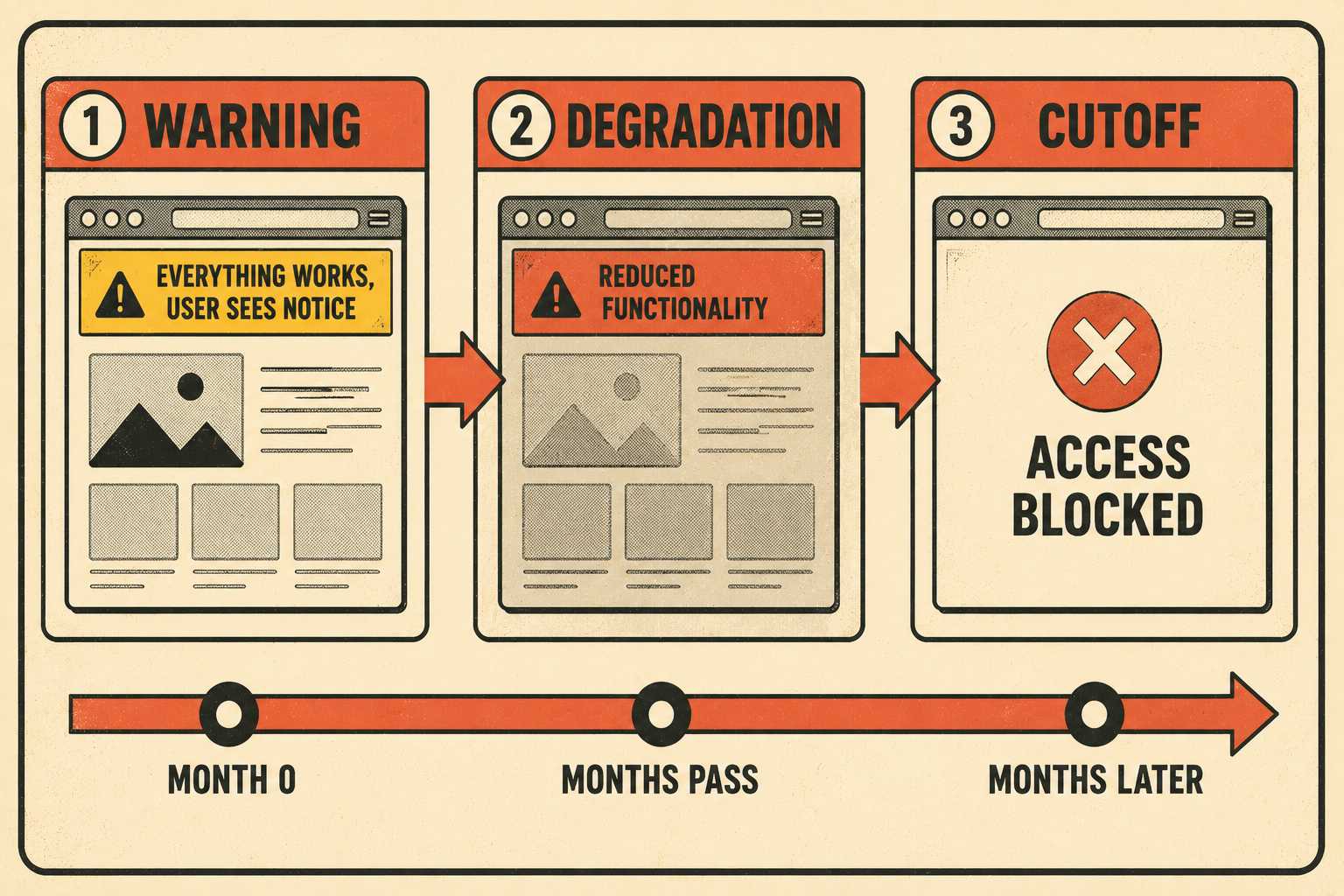
Phased rollouts reduce the shock. A well-structured deprecation moves through three stages: a warning period where users are notified but everything still works, a feature degradation phase where the product continues to function but with reduced capability or visible warnings, and a hard cutoff where access ends. Each stage should be documented separately, with its own timeline and clear description of what changes at each threshold.
Where the Warnings Actually Belong
A single line in the release notes is insufficient for a major deprecation. The communication must be layered across multiple surfaces.
Release notes are the starting point, but they are read primarily by engineers and system administrators. The deprecation must also live in a dedicated migration guide, detailing the specific steps required to upgrade. The Write the Docs community recommends including what is being deprecated, how it will affect customers, required actions, mitigation options, and recommended replacements. Some teams also maintain a dedicated page in the docs for deprecated features, which gives users a single place to check the full history of what has been retired.
In-app banners are necessary for the final months of the transition. Google Workspace's IE11 deprecation announcement described plans to show banners to all affected users for several weeks before the March 2021 cutoff. These warnings should be targeted only at users on the affected versions to avoid alarming the rest of the user base.
The version compatibility matrix itself should be a standalone page, easily searchable and clearly formatted as a table. While inline checks within specific feature documentation are helpful, a centralized matrix prevents users from having to hunt across multiple pages to determine if their system is supported. Atlassian's end-of-support announcements page for Confluence lists every platform, database, and Java version that has been retired, with links to the original announcement for each. That model works because it is findable, versioned, and does not require a user to read through every release note to reconstruct the history.
The question of whether compatibility information should live in the main docs or a standalone page has a practical answer: both. The standalone page is the source of truth. The main docs should link to it and include inline callouts where relevant, particularly on pages that describe features with specific version requirements.
The People Who Can't Upgrade
Not every user is running the latest hardware on an unrestricted network. Some users cannot simply click "update."
Corporate environments often lock down browser versions and operating systems for security and compliance reasons. These users rely on their IT departments to approve and deploy updates, a process that can take months. A long notice period is essential for these enterprise customers to align their internal upgrade cycles with your deprecation schedule. The IATI software deprecation process sets a minimum of six months for removing an entire tool, and recommends twelve months or more for major platform changes.
Accessibility users face similar constraints. As AudioEye's research on assistive technology users documents, many users with disabilities deliberately stay on older OS versions because they know what can happen to their access when updates are made. Screen readers and other assistive technologies are often tightly coupled to specific browser and OS versions. A forced upgrade can break their setup entirely, leaving them unable to navigate the web. The documentation for a deprecation should explicitly acknowledge this group and, where possible, provide a contact path for users who need extended support.
There are also regional constraints. In areas with lower hardware refresh cycles, users may be physically unable to run modern operating systems. Dropping support for older versions effectively locks them out of the product.
These edge cases highlight why deprecation is a judgment call. It is a balance between the necessity of modernizing the platform and the reality of the user base. The technical writer is often the person managing this balance, deciding how firm the language should be, when the warnings need to escalate, and whether the framing acknowledges the inconvenience honestly or papers over it with corporate-speak.
Automating the Inevitable
Managing a deprecation involves updating compatibility tables, revising system requirements pages, adding warning callouts to legacy feature docs, and drafting the release notes. It is a substantial manual effort, and it repeats with every major release cycle.
Technical writers often end up acting as human grep functions, searching for "IE11" or "macOS 10.14" across dozens of pages and replacing it with the new baseline. It is tedious, error-prone work. Docs-as-code workflows can help by treating documentation like source code, but even then, the manual effort of tracking which versions are still supported across a large documentation set is significant.
This is where the process breaks down. The writer is too busy updating version numbers to focus on the communication strategy.
Doc Holiday changes this dynamic. It generates version compatibility sections automatically from release metadata and pull request context, and propagates those changes across the documentation when the supported browser matrix is updated in the codebase. The manual tracking problem goes away.
That gives the technical writer the structure to focus on the judgment calls: how to frame the deprecation, where to surface the warnings, how to handle the edge cases, and how to manage the rollout calendar. The transition becomes a managed process, rather than a Tuesday morning crisis.



