How to Maintain Release Notes During a Platform Migration


If you were to sit down and read the release notes of a company undergoing a major platform migration, you would probably think they were having a collective breakdown.
On Tuesday, an endpoint is deprecated. On Wednesday, a hotfix is issued because a critical customer was still using it. On Thursday, a new parallel system is announced, but it only supports half the legacy features. By Friday, the hotfix is rolled back, the parallel system is delayed, and the support team is fielding angry tickets from users who have no idea what is going on.
This is not a failure of documentation. It is a failure to recognize that migration documentation is a different problem from steady-state documentation, and that the tools and habits that work for one will actively fail you during the other.
The core answer is this: during a platform migration, release notes need a triage framework, not a completeness standard. You cannot document everything accurately and quickly. You have to decide what matters to whom, build parallel communication streams for different audiences, and accept that some of your documentation will be provisional. The goal is not a perfect record. It is a reliable map through a chaotic landscape.
Why the Normal Workflow Breaks
The standard documentation cadence is built on a comfortable fiction: that the system you are documenting is stable, that the engineers building it have time to explain what they built, and that the audience reading the notes is roughly uniform in what they need to know.
None of that is true during a migration.
Engineers are context-switching constantly. They are managing the legacy system, building the new one, fielding escalations from customers who are caught in the middle, and occasionally discovering that something they assumed was stable has quietly been broken for three weeks. Asking them to write coherent changelogs in this environment is not unreasonable, but it is also not going to happen without a system that makes it easy.
The product surface is changing faster than anyone can track. A feature that was stable last sprint is now deprecated. An endpoint that was supposed to be removed is still running because three enterprise customers depend on it. A new API was announced but only works for a subset of use cases. The version compatibility matrix, which was already complicated, has become genuinely dangerous to misread.
The audience has also expanded. During steady-state development, your release notes are mostly read by developers and power users who want to know what changed. During a migration, the audience includes nervous customers who are worried about disruption to their workflows, internal teams managing downstream integrations who need to know exactly which endpoints are going away and when, support staff who are fielding confused tickets and need troubleshooting shortcuts, and business stakeholders who want to understand the migration timeline and risk profile without wading through API diffs.
A study examining over 32,000 release notes across 1,000 GitHub projects found significant discrepancies between what release note producers think users need and what users actually need. That gap is manageable during normal development. During a migration, it becomes a serious operational problem.
The Tension You Cannot Resolve, Only Manage
Migration documentation has two goals that pull in opposite directions.
It needs to be detailed enough that technical users can debug breaking changes and compatibility issues. A developer whose integration is failing at 2am needs to know exactly which parameter was removed, what replaced it, and whether the change is permanent or temporary scaffolding. Vague language about "improvements to the authentication flow" is not useful to them.
At the same time, it needs to be high-level enough that non-technical stakeholders understand the business impact and timeline. An executive asking whether the migration will affect the Q3 product launch does not need to read about authentication headers. They need to know which phase of the migration is currently in progress, what the risk profile looks like, and what the contingency plan is if something goes wrong.
It also needs to be published fast, because changes are shipping constantly. But it needs to be accurate, because errors during a migration create cascading failures. A wrong deprecation date in your release notes can cause a developer to delay their migration work, which then causes their integration to break when the actual cutoff arrives. A missing compatibility note can send a support team down the wrong troubleshooting path for hours.
You cannot fully resolve this tension. You can only manage it by being explicit about the tradeoffs you are making, and by building a documentation structure that serves each audience without pretending to serve all of them equally well in a single document.
A Triage Framework for What to Document
Not every change during a migration deserves immediate documentation. Some changes are user-facing and breaking. Some are internal refactoring that users will never see. Some are temporary scaffolding that will be deprecated once the migration is complete. The instinct to document everything is understandable, but it creates noise that makes the important things harder to find.
Here is a working framework for triage:
Document immediately: Any change that breaks an existing integration, modifies a public API contract, removes or renames a feature that users can see, or changes behavior that users depend on. These require immediate documentation with a clear migration path. Breaking changes should appear at the top of the release notes, not buried in a list of minor fixes, as release notes best practices guides consistently recommend.
Batch and document at phase boundaries: Changes that are part of ongoing internal restructuring, performance improvements with no user-visible behavior change, and temporary scaffolding that will be removed before the migration is complete. These can be batched into a summary update at the end of each migration phase, rather than generating noise with every individual commit.
Skip entirely: Internal refactoring with no user impact, infrastructure changes that do not affect the product surface, and changes to internal tooling. These belong in internal engineering documentation, not in user-facing release notes.
The hardest category is rollbacks. When you ship a change, document it, and then have to pull it back, you have two bad options: quietly edit the original release note as if the change never happened, or publish a rollback notice that acknowledges the failure. The second option is always better. Users who acted on the original documentation need to know the state has changed. Trying to erase the history erodes trust faster than the rollback itself does.
Segmenting the Audience
When the system is stable, your audience for release notes is relatively homogenous. When the system is migrating, your audience fractures, and a single document cannot serve all of them well.
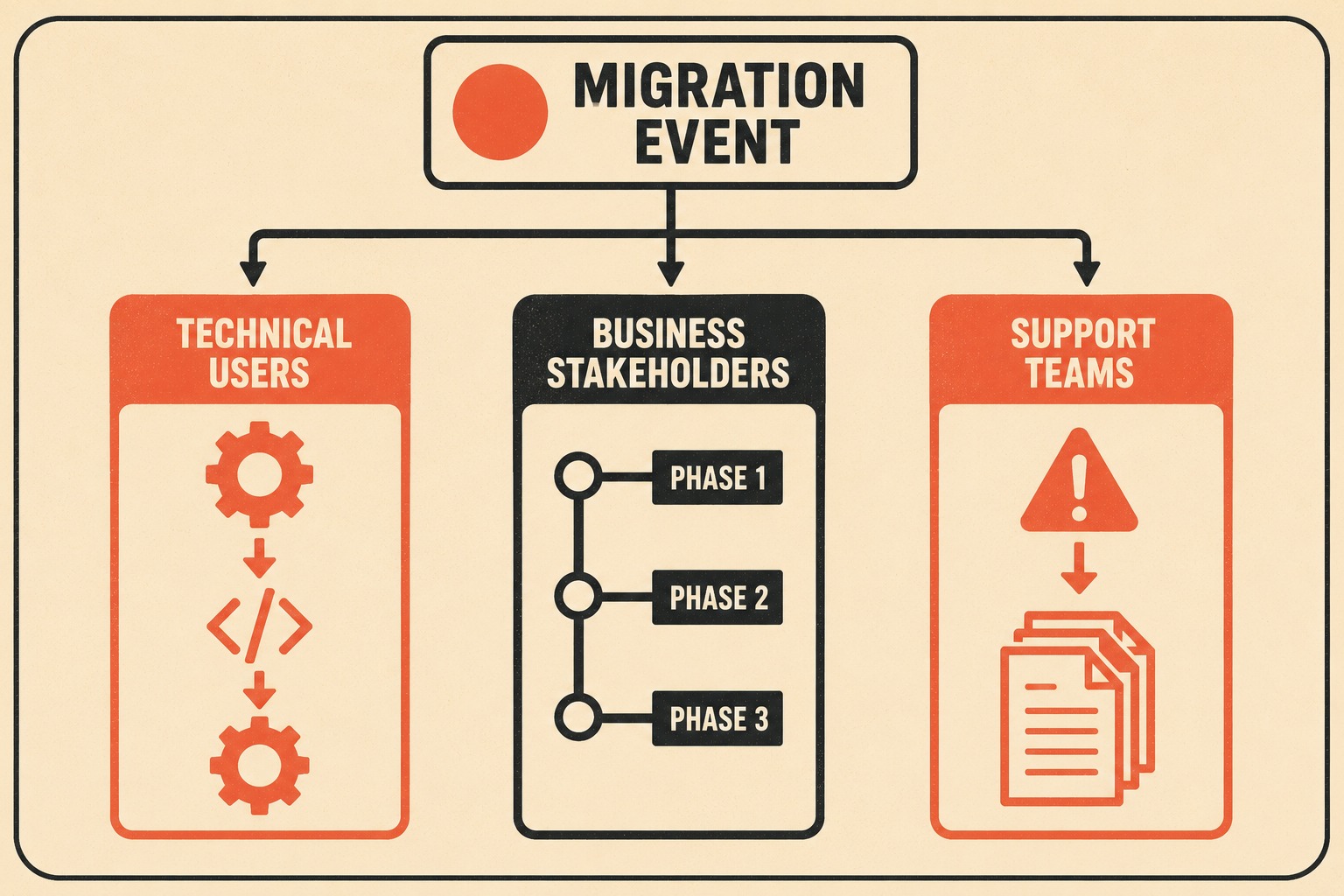
Technical users need API diff details, compatibility matrices, and exact deprecation timelines. They need to know which version introduced a breaking change, what the migration path looks like, and how long they have before the old behavior is removed. The Fern API documentation guide notes that breaking changes without migration guides or deprecation timelines break existing integrations without warning, which is exactly the kind of failure that generates the most support tickets during a migration.
Business stakeholders and external customers need something completely different. They need migration phase timelines, risk summaries, and reassurance that the migration will not disrupt their workflows. They need to understand what is changing, why it matters to them, and what, if anything, they need to do. They do not need to read about authentication headers.
Support teams need a third thing: troubleshooting shortcuts and known issue lists. During a migration, support volume spikes because users are encountering behavior they do not understand. A support team that has a clear, up-to-date list of known issues and their workarounds can resolve tickets in minutes instead of hours. A support team that is reading the same release notes as everyone else is just as confused as the customers.
The practical solution is parallel communication streams. For technical users, maintain a versioned, highly detailed changelog that tracks every API modification, deprecation notice, and compatibility change. For business stakeholders and external customers, publish a high-level migration status page that summarizes the current phase, the upcoming changes, and the timeline. For support teams, maintain an internal known issues document that is updated in real time as new problems are identified.
Do not mix the streams. A business stakeholder does not care about the new authentication headers, and a developer trying to fix a broken integration does not care about your strategic vision for the new platform. Trying to serve both audiences in a single document means neither audience gets what they need.
Documenting a System That Is Not Consistent Yet
One of the most disorienting aspects of migration documentation is that the platform is often in a hybrid state for months, sometimes years. Old APIs are deprecated but still running. New endpoints exist but are not fully stable. Feature parity between the legacy and new systems is incomplete.
Martin Fowler's writing on legacy displacement describes this as one of the most underestimated challenges in migration work. The legacy system has accumulated features over years, many of them undocumented workarounds for past bugs and limitations. Replicating that behavior in the new system is harder than it looks, and the gap between what the legacy system does and what the new system does is often larger than anyone expected.
The documentation challenge is that users need to know which system they are on, which features are available on each, and what the plan is for closing the gap. Vague language about "upcoming enhancements" is not useful. If a feature exists in the legacy system but not the new one, say so. If an API is deprecated, provide a clear timeline for when it will be turned off, and stick to it.
Slack's approach to deprecation communication is instructive here. Their design team has written about the importance of clarity over compassion in deprecation notices: "We avoid using jargon like deprecating or euphemisms like sunsetting. It may seem more humane to use softer, more vague language, but in practice it delays their understanding and wastes their time" — a point made well in Slack's writing on deprecation. The same principle applies to migration documentation. Users can handle bad news. They cannot handle ambiguity.
When documenting hybrid states, use version-specific behavior notes. Make it explicitly clear which system a piece of documentation applies to. If the new system behaves differently from the legacy system in a way that is intentional, explain why. If the difference is a known gap that will be addressed, say when. Do not assume the user knows whether they are on the legacy platform or the new one, because during a migration, they often do not.
Building a Workflow That Can Keep Up
Migrations move fast. Release notes often cannot keep up, and the gap between what shipped and what was documented tends to widen over time as the engineering team gets deeper into firefighting mode.
The only sustainable solution is to reduce the friction between shipping a change and documenting it. This means a few things in practice.
First, automate what can be automated. Changelog generation from commit messages and pull requests is well-established at this point. Tools that parse conventional commit formats (feat:, fix:, breaking:) can generate a first-draft changelog automatically, which engineers can then review and annotate rather than writing from scratch. The Mozilla engineering blog has described this approach as a way to extract metadata from git history without requiring writers to start from a blank page. The first draft is rarely publication-ready, but it is much easier to edit than to write.
Second, templatize common migration-phase changes. If your migration involves a predictable sequence of phases (deprecation announcement, parallel system launch, cutover, legacy shutdown), build templates for each phase that teams can fill in rather than write from scratch. The structure of a deprecation notice is the same every time. The structure of a compatibility matrix update is the same every time. Templates do not reduce the quality of documentation; they reduce the cognitive load of producing it under pressure.
Third, publish incrementally. Do not wait for a complete picture before publishing. If you know a breaking change is coming but the migration path is not finalized yet, publish what you know and update it when you know more. Users would rather have incomplete information that is clearly labeled as provisional than complete information that arrives too late to act on.
Fourth, assign documentation ownership explicitly. During a migration, documentation tends to fall through the cracks because everyone assumes someone else is handling it. Assign a specific person to own the release notes for each migration phase, with the authority to pull information from engineers and the expectation that they will publish updates on a defined cadence.
Communicating Uncertainty Without Eroding Trust
During a migration, some things are genuinely unknown. A feature might ship in the next sprint, or it might slip. A breaking change might affect a subset of users, but the team is not sure which subset yet. A rollback plan exists, but the trigger conditions are not finalized.
The instinct is to wait until you have complete information before publishing. This is the wrong instinct.
Users and stakeholders are more forgiving of uncertainty than they are of silence. If you know a breaking change is coming but you do not know the exact date, say so. If you know a feature is delayed but you do not know by how long, say so. If you know a rollback is possible but you do not know the trigger conditions, say so. The goal is to communicate what you know, what you suspect, and what you are still figuring out, in a way that is honest without being alarming.
AWS's guidance on stakeholder management for mission-critical migrations makes a related point: organizations that maintain transparency on timeline, cost, and scope tradeoffs are better equipped to avoid schedule disruptions because they surface potential issues early, before they escalate into delivery risks. The same logic applies to external documentation. Users who know a change is coming and roughly when can plan for it. Users who are surprised by a breaking change cannot.
The specific language matters. "We are evaluating the impact of this change on legacy integrations and will provide an update by Friday" is useful. "This feature may be affected by ongoing migration work" is not. Uncertainty should be specific, time-bounded where possible, and accompanied by a clear statement of what you will do when you know more.
The Failure Modes Worth Naming
A few patterns come up repeatedly when migration documentation goes wrong.
The first is the completeness trap. Teams try to document everything, the documentation falls behind, and users lose confidence in its accuracy. The fix is the triage framework described above: not everything needs to be documented, and not everything needs to be documented immediately.
The second is the single-stream problem. Teams publish one set of release notes for all audiences, which means the technical users are frustrated by the lack of detail and the business stakeholders are overwhelmed by the technical noise. The fix is parallel streams.
The third is the silent rollback. A change is shipped, documented, and then pulled back without any update to the documentation. Users who acted on the original documentation are now operating on incorrect information. The fix is a rollback notice that acknowledges the change, explains what happened, and describes the current state.
The fourth is the vague deprecation. A feature is marked as deprecated without a clear timeline or migration path. Users do not know when to act, so they do not act until the feature is removed and their integrations break. The fix is specific, time-bounded deprecation notices with explicit migration paths.
The fifth is the documentation freeze. Teams stop updating release notes during the most chaotic phases of the migration because they do not have time. This is exactly when users need the documentation most. The fix is automation and templates that reduce the cost of publishing, so that documentation can continue even when the team is under maximum pressure.
Where This Usually Falls Apart
The honest answer is that most of these problems are not writing problems. They are workflow problems.
Manual documentation processes can work during a migration. Teams that invest in clear ownership, consistent templates, and disciplined review cycles do manage to keep their changelogs accurate even under pressure. But the overhead is real. Every manual step — pulling context from an engineer, formatting a deprecation notice, updating a compatibility matrix — is a task competing with the firefighting that defines migration work. The discipline required is significant, and it compounds as the migration drags on.
The question is not whether manual processes can function. They can. The question is whether the team can sustain them at the pace a migration demands, across the full duration of the transition, without the documentation gradually slipping behind as the pressure mounts.
This is where tooling makes a practical difference. Doc Holiday reduces the friction of that manual overhead by generating release notes and API references directly from code commits, giving writers a structured first draft to review and refine rather than a blank page to fill. The workflow discipline still matters — someone still needs to validate accuracy, catch edge cases, and ensure the narrative makes sense to the reader. But the volume of manual effort required to stay current drops considerably, which makes it easier to sustain the cadence over a long migration.
The goal is not to eliminate human judgment from the documentation process. It is to make sure the humans doing the work are spending their time on the parts that actually require judgment, rather than on the parts that can be handled by a system.



