How to Sync Gitlab Releases to Confluence


If you ran a mid-sized engineering team, and someone told you that every time you shipped a release, a highly paid engineer would need to stop what they were doing, open two browser tabs, copy text from one, paste it into the other, reformat the markdown, and hit publish—you would probably ask why you were paying for enterprise software.
Yet this is exactly how most teams handle release notes between GitLab and Confluence.
The short answer to whether there is a native sync: there isn't. GitLab's built-in Confluence integration (GitLab Docs, 2024) only adds a navigation link to your project sidebar. It replaces the GitLab wiki menu item with a pointer to your Confluence workspace. It does not sync content, move release notes, or prevent version drift. The integration's own documentation states plainly: "Any content you have in Confluence is not displayed in GitLab."

That gap is the problem. Release information lives in your code repository. Documentation lives in your company wiki. When those two systems don't talk to each other, the result is manual copy-paste cycles, stale release notes that fall out of sync within days, and support teams fielding questions about undocumented changes. Mohamed et al.'s 2025 review of documentation drift in software development identifies this as a recognized engineering problem, not a team discipline problem.
If you are trying to solve this today, you have three real options.
The Manual Approach (and Why It Eventually Breaks)
Most teams start here. After a deployment, someone opens the GitLab release page, copies the changelog, navigates to Confluence, creates a new page, and pastes the notes. It works until it doesn't.
The failure mode is predictable. It works at monthly release cadence. It starts to crack at weekly. It collapses when the person doing it leaves, or when the team grows and nobody is sure who owns the task anymore.
The operational cost is not just the time spent copying and pasting. A meta-study of over 60 academic papers found that documentation tasks consume roughly 11% of developers' work hours (Stack Overflow Blog, 2024), and that's before accounting for the downstream cost of documentation that's wrong. When manual processes fail, they fail silently. Users discover new features by accident. Internal teams stop trusting the wiki.
This approach is defensible for very small teams with infrequent releases, where the overhead of building an automated solution genuinely outweighs the pain of manual entry. For everyone else, it is a debt that compounds.
Building It Yourself: Webhooks and the Confluence API
For teams with engineering resources, a scriptable solution is feasible. The architecture is not complicated in concept.
GitLab fires a webhook on every release event (GitLab Docs, 2024). The payload includes the release name, tag, description, linked assets, and the associated commit. You point that webhook at a middleware service—a small Lambda function, a Cloud Run job, whatever you prefer—that parses the JSON, formats the content into Confluence's Atlassian Document Format, and calls the Confluence Cloud REST API v2 (Atlassian Developer Docs, 2024) to create or update a page in the appropriate space.
This gives you complete control. You can map release tags to specific Confluence spaces, include links back to merge requests, add custom metadata, or generate a parent page per major version with child pages per patch.
The downside is that you are now maintaining an internal integration product. When Atlassian deprecates an API endpoint, your pipeline breaks. When GitLab changes its webhook payload schema, your parser breaks. A "simple" integration can easily consume 20–30% of an engineer's time in perpetual maintenance mode (Leen.dev, 2025), and the first-year total engineering cost of a single custom integration often exceeds 400 hours when you factor in maintenance, security reviews, and handling API changes.
This option makes sense for mid-to-large engineering teams with dedicated platform engineering resources who need highly customized output and are willing to absorb the ongoing maintenance cost.
No-Code Platforms and Marketplace Plugins
If you want automation without writing the middleware yourself, two paths exist.
No-code automation platforms like Make (Make, 2024) offer pre-built modules for both GitLab and Confluence. You visually map the GitLab release trigger to a Confluence "Create Page" action, configure field mappings, and deploy. No server to maintain, no authentication tokens to manage manually. The tradeoff is per-operation cost that scales with release frequency, and a dependency on a third-party platform that can change its pricing or deprecate connectors.
The Atlassian Marketplace has plugins that bridge the two tools, including GitLab for Confluence (Atlassian Marketplace, 2024), which embeds live GitLab data—merge requests, pipelines, issues, files—directly into Confluence pages. These plugins are generally designed to display live code activity rather than generate and archive point-in-time release notes. Effectiveness varies by plugin and Confluence version (Cloud vs. Server vs. Data Center), and licensing costs scale with your user count.
The table below summarizes how the three options compare across the dimensions that typically drive the decision:
The Actual Problem This Question Is Pointing At
Syncing GitLab to Confluence is a symptom of a deeper workflow issue: trying to maintain release communication in two places simultaneously.
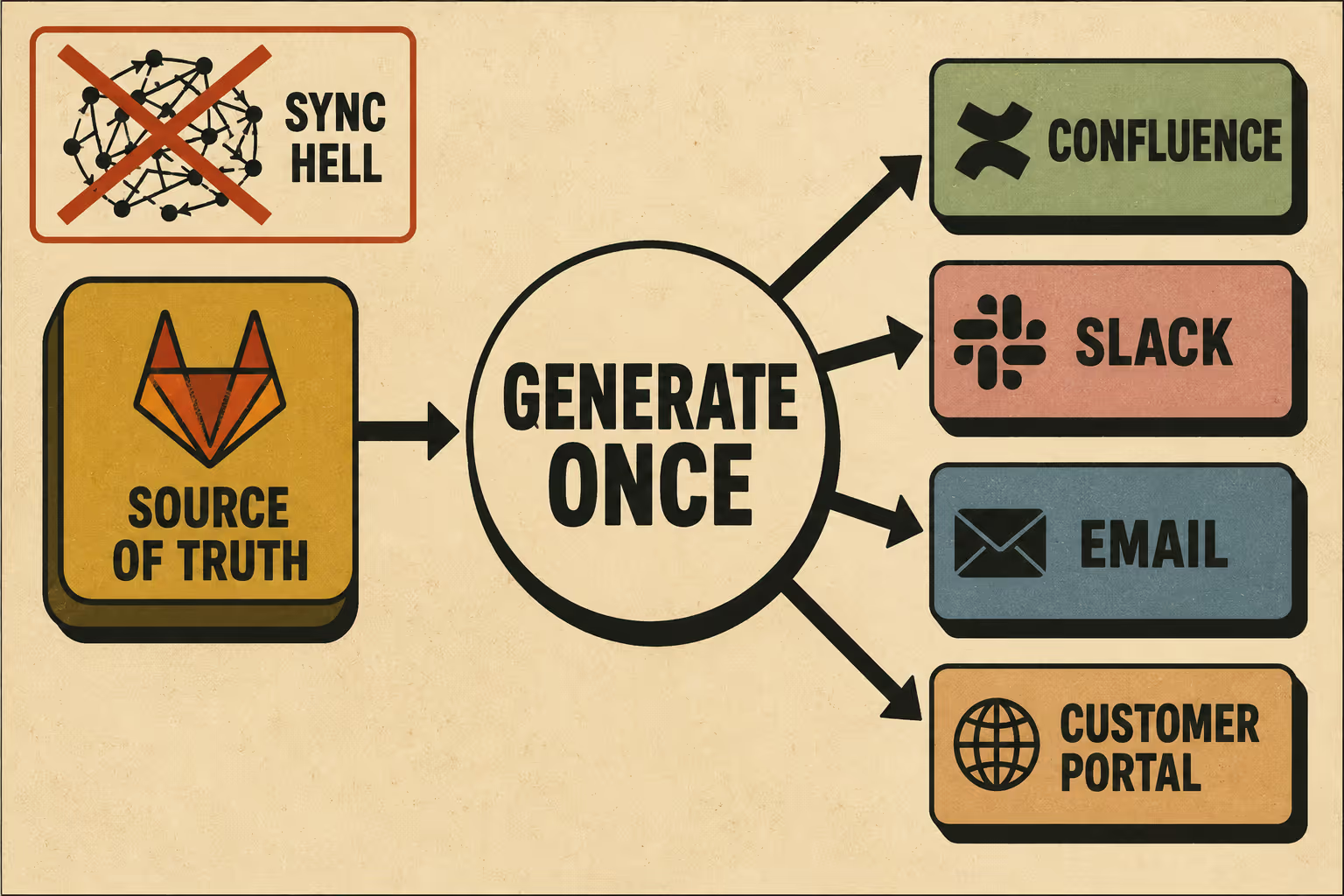
When you copy data from a system of record to a system of engagement, you create a synchronization problem. The sync script is not the solution; it is the patch on top of the problem. Every time you update the script, you are paying interest on a structural debt.
GitLab already has mechanisms to generate changelogs automatically from commit trailers (GitLab Blog, 2025). The Changelog API parses structured commit metadata and assembles release notes without manual intervention. The output lives in GitLab, where it belongs, as the authoritative source of what changed and when.
The more durable approach is to generate release notes once, from the source of truth, and distribute them to wherever they need to go—Confluence, Slack, email, a customer portal—rather than maintaining a separate documentation artifact that has to be kept in sync with the repository.
If your team is spending engineering time building or maintaining sync scripts, or paying for multiple tools to move release data around, the workflow itself is probably the problem.
Doc Holiday generates structured release notes directly from GitLab release metadata and commit history, and provides the validation structure to ensure output quality without requiring you to rebuild the integration from scratch. The release notes exist in one place. Distribution is a publishing step, not a synchronization problem.