How to Generate Release Notes From Github Actions


Your engineering team just spent three months building a feature that solves a real customer problem. They shipped it on time. The product marketing team drafted the positioning. The changelog was updated, the product update email was sent, and the sales team was briefed.
And yet, the release notes are a mess.
They are a chronological list of raw commit messages. They mention internal ticket numbers that customers can't access. They describe database migrations and refactored authentication flows, but they don't explain what the user can actually do now. The support team is confused, the sales team is asking for translations, and the customers are ignoring them entirely.
This happens because manual documentation happens after the work is done. It is treated as an administrative tax on velocity, rather than a core part of the engineering process. But you can close that gap by generating release notes as part of the release itself — using GitHub Actions to pull commit messages, pull request descriptions, and tags to construct a structured changelog.
Anyway. We can all now automate our release notes, and seem to be having trouble figuring out how to make them actually useful.
How the Infrastructure Actually Works
The technical foundation is straightforward. GitHub Actions can trigger workflows on specific events, and two triggers are relevant here.
The first is the release event with the published activity type. This fires when you publish a release through the GitHub UI or the API. The second is a push event filtered to tags, which fires whenever a new tag is pushed to the repository — as covered in GitHub's documentation on workflow trigger events. When that event occurs, GITHUB_REF contains the tag reference (refs/tags/<tag_name>), and GITHUB_SHA points to the last commit in the tagged release.
When that event fires, the workflow can access repository data to build the notes. You can use the GitHub REST API directly, passing generate_release_notes: true when creating a release, or you can use community actions like release-drafter or release-changelog-builder-action.
Here is a working example using release-drafter. It runs on every push to the main branch and keeps a draft release up-to-date as pull requests are merged. When you are ready to ship, the draft is already populated:
name: Release Drafter

on:
  push:
    branches:
      - main

permissions:
  contents: write
  pull-requests: read

jobs:
  update_release_draft:
    runs-on: ubuntu-latest
    steps:
      - uses: release-drafter/release-drafter@v7
        with:
          config-name: release-drafter.yml
The real work happens in the configuration file (.github/release-drafter.yml). This is where you define how changes are grouped. Release Drafter lets you map pull request labels to categories, so that features, bug fixes, and maintenance tasks are separated automatically:
name-template: "v$RESOLVED_VERSION"
tag-template: "v$RESOLVED_VERSION"
categories:
  - title: "🚀 Features"
    labels:
      - "feature"
      - "enhancement"
  - title: "🐛 Bug Fixes"
    labels:
      - "fix"
      - "bug"
  - title: "🧰 Maintenance"
    label: "chore"
change-template: "- $TITLE @$AUTHOR (#$NUMBER)"
version-resolver:
  major:
    labels:
      - "major"
  minor:
    labels:
      - "minor"
  patch:
    labels:
      - "patch"
  default: patch
template: |
  ## Changes

$CHANGESThe version-resolver block is worth noting. It reads the labels on merged pull requests and determines the next semantic version automatically. No more manually deciding whether a release is a major, minor, or patch bump.
If your team works without pull requests (or with a commit-heavy workflow), release-changelog-builder-action offers a COMMIT mode that parses commit messages directly. It uses a regex to extract the conventional commit type from the message and groups changes accordingly:
- name: Build Changelog
  uses: mikepenz/release-changelog-builder-action@v6
  with:
    mode: "COMMIT"
    configurationJson: |
      {
        "categories": [
          { "title": "## Feature", "labels": ["feat"] },
          { "title": "## Fix", "labels": ["fix"] },
          { "title": "## Other", "labels": [] }
        ],
        "label_extractor": [
          {
            "pattern": "^(feat|fix|chore|docs|refactor){1}(\\([\\w\\-\\.]+\\))?(!)?: ([\\w ])+([\\s\\S]*)",
            "on_property": "title",
            "target": "$1"
          }
        ]
      }
  env:
    GITHUB_TOKEN: ${{ secrets.GITHUB_TOKEN }}
This approach works, but it depends entirely on your commit messages being well-formed. Which brings us to the part everyone gets wrong.
The Part Everyone Gets Wrong
Structure is not the same as quality.
Commit messages and pull request titles are written for other developers. As Eva Parish explained at DevRelCon, they are terse technical descriptions of what changed in a unit of work — not communications written for the end user.
If you just pipe those messages directly into a customer-facing changelog, you are going to confuse your audience. An empirical study of 32,425 release notes across 1,000 GitHub projects</a> found significant discrepancies between what release note producers think is important and what users actually need, and that vague or imprecise release notes lead to inadequate understanding of current development.
There are a few ways teams handle this gap, and none of them is perfect on its own.
Some enforce strict commit conventions. They adopt the Conventional Commits specification, which requires every commit to be prefixed with a type (feat, fix, BREAKING CHANGE, and others) and an optional scope. This makes the automated grouping much more reliable. It also forces developers to think about the impact of their changes before they merge them. The SEI has written about how adopting this convention was foundational to enabling automated semantic versioning across a template repository used in about 100 other pipelines.
Others add a manual review step. The automation generates the draft, and a product manager or technical writer edits it before it is published. This ensures the tone is right and the value proposition is clear.
Some teams post-process with AI, using the raw changelog as input to an LLM that rewrites the entries in customer-friendly language. This works reasonably well for internal drafts, but it introduces its own review burden.
I'm partial to a combination of the first two. The automation provides the structure, and the human provides the context. The best implementations combine automated structure with human validation before customer distribution.
A few common implementation challenges are worth flagging:
- Sparse commit messages. Teams that don't enforce commit conventions will get changelogs full of fix: stuff and update. The automation can only work with what it's given.
- Noise filtering. Dependency updates, CI configuration changes, and documentation fixes often don't belong in a customer-facing changelog. Use exclude-labels in release-drafter or exclude-paths in release-changelog-builder-action to filter them out.
- Audience targeting. An internal changelog (for your engineering team) and a customer-facing changelog (for your users) are different documents. The internal version can include PR numbers, author names, and technical detail. The customer-facing version should lead with outcomes. If you are maintaining both, you need two templates and two review processes.
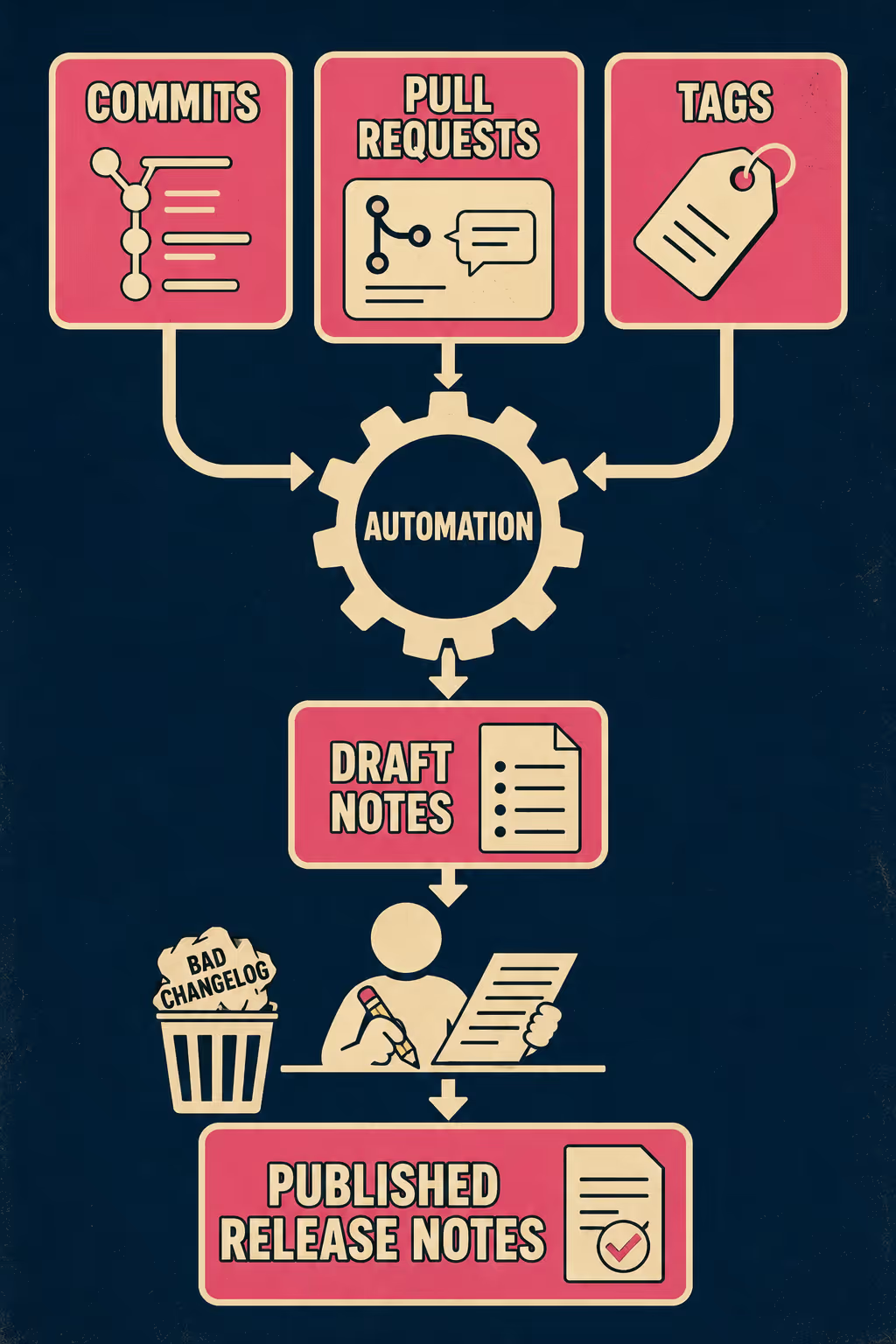
The Quality Control Layer
As your release cadence increases, or as the number of repositories grows, maintaining these workflow files and validating the output quality becomes its own operational challenge.
You end up with dozens of .github/release-drafter.yml files scattered across your organization. You have to ensure that every team is using the same labels and the same commit conventions. You have to manage the review process across multiple teams and multiple release schedules. The automation that was supposed to save time starts generating its own maintenance overhead.
Unmanaged automation fails; managed automation scales.
This is where teams that have outgrown manual workflow maintenance start looking for a system that provides structure for validation and multi-repo management. Doc Holiday generates customer-ready release notes automatically from these same GitHub events, but it adds a quality control layer on top. It drafts the notes from your commits, flags edge cases, and provides a dashboard where a senior writer can review and refine the output before it goes live. It gives lean teams the structure to validate, manage, and scale their documentation without rebuilding a large headcount.



