Generating Structured Release Notes From Git Commit History


It is Wednesday afternoon. The release candidate is locked. Someone asks where the release notes are.
You open the terminal and run git log --oneline. The output fills the screen. Some commits are clear: feat(auth): add OAuth2 login with GitHub provider. Some are cryptic: fix stuff. Some reference internal ticket IDs with no context: JIRA-1234. And somewhere in that wall of text is a breaking change that will affect every customer who upgrades — if you can find it.
The problem is not extracting the data. The data is right there. The problem is interpretation and translation. How do you turn an audit trail written by engineers, for engineers, into a document that customers can actually act on?
The short answer: you need a skilled human in the loop, and you need tooling that handles the repetitive work so that human can focus on the decisions that actually matter.
The Problem Isn't the Data, It's the Judgment
Git history is a detailed audit trail, but it is a noisy one. Research on commit message quality found that an average of 44% of messages in major open-source projects lack sufficient information. Even teams that adopt structured conventions like the Conventional Commits specification — which defines commit types like feat, fix, chore, and BREAKING CHANGE — still produce raw material written from the perspective of the person who wrote the code, not the person who will use the feature.
Naive automation fails because it treats all commits equally. A script that dumps commits into categories will surface internal refactors, dependency bumps, and half-finished features alongside real user-facing changes. The output will be technically accurate. It will also be operationally useless.
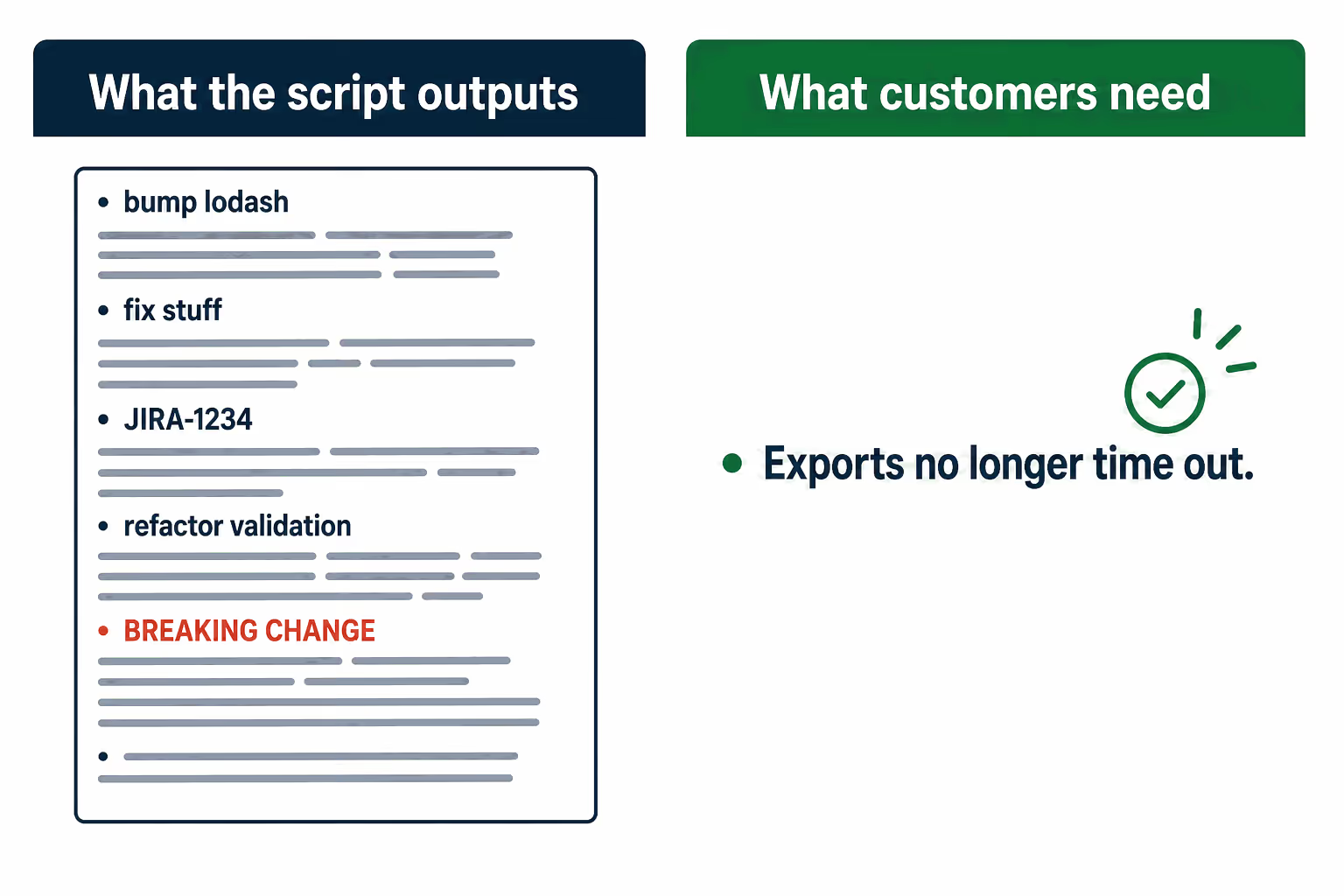
The harder problem is deciding what belongs in release notes at all. A chore(deps): bump lodash commit is not user-facing. A refactor(api): extract validation logic commit is probably not either. But a fix(export): resolve timeout on large datasets almost certainly is, even if the commit message doesn't say so in customer language. Making that call requires judgment that a script does not have.
Worse, naive automation tends to miss the most critical information. A comprehensive analysis of release note challenges on GitHub found that producers tend to overlook information rather than include inaccurate details, with breaking changes being the most commonly omitted content. A missed breaking change is not just a documentation failure. It is a support ticket, a customer escalation, and a trust problem.
The raw material problem compounds this. When engineers don't communicate half the changes they make, it contributes directly to documentation drift and outdated content — and the technical writer ends up with an incomplete picture before they even start. A survey of practitioners found that commits account for only 19% of the content in release notes, with the rest coming from issues and pull requests. The commit log is the starting point, not the whole story.
What a Skilled Writer Actually Does with the Same Log
There is a meaningful difference between a junior engineer running git log and a technical writer who understands customer impact. The output is not the same.
The skilled workflow starts with filtering. Not every commit belongs in release notes. Internal refactors, CI configuration changes, dependency updates, and test suite additions are part of the engineering record, not the customer record. Separating user-facing changes from internal ones requires understanding what the product actually does and who uses it.
After filtering comes grouping by impact type. New features, bug fixes, breaking changes, and deprecations each carry different weight for different readers. A project manager cares more about new features than minor bug fixes. A developer integrating your API cares intensely about breaking changes and deprecations. Grouping correctly is not just organizational — it is a communication decision.
Then comes the translation step. fix(export): resolve timeout on large datasets becomes "Exports for large datasets no longer time out." The commit describes what changed in the code. The release note describes what changed for the user. These are different sentences, and writing the second one well requires knowing what the user was experiencing before the fix.
Cross-referencing with issue trackers and support tickets adds the context that commit messages almost never contain. A commit that references a ticket ID might be the resolution to a bug that affected thousands of customers, or it might be a minor edge case. The commit message will not tell you which. The ticket will.
Finally, the writer verifies version numbers, dependencies, and upgrade paths. Semantic versioning ties version bumps directly to the type of change: a breaking change requires a major version bump, a new feature requires a minor bump, a bug fix requires a patch. Getting this wrong is not just a documentation error — it breaks the contract with every developer who depends on your versioning.
This is skilled work. It takes time, domain knowledge, and judgment. And it is exactly the kind of work that gets cut when teams are under pressure to ship.
Where Automation Earns Its Keep
The right automation model does not replace the writer. It gives the writer a system that handles the repetitive work — extraction, formatting, first-pass categorization — while preserving their judgment on what matters and how to describe it.
AI tools are genuinely good at translating commit messages and file diffs into clear, structured information. Given a well-structured prompt and a clean commit log, a language model can group changes by type, rewrite passive commit messages into active prose, and produce a first draft that would take a human an hour in about thirty seconds. The Microsoft GenAIScript team demonstrated this by using git commit history and file diffs together as input, explicitly excluding non-user-facing files before passing the data to the model. That exclusion step — deciding what not to include — is itself a human judgment call baked into the workflow design.
The workflow that actually works looks like this:
- AI processes the commit history and groups changes by likely impact type.
- A human reviews the groupings, removes internal changes, and validates the categorization.
- AI generates user-facing descriptions based on the commit content and any linked issue references.
- A human edits for clarity, ensures breaking changes are flagged prominently, and confirms upgrade instructions are correct.
- The human approves the final output.
This is not a five-step process that takes five times as long. Steps 1 and 3 are seconds. Steps 2, 4, and 5 are the work that was always going to require a human — they just now happen with a much better first draft in front of them. Teams that have built this kind of pipeline report that it transforms release notes from a multi-hour context switch into a focused review task.
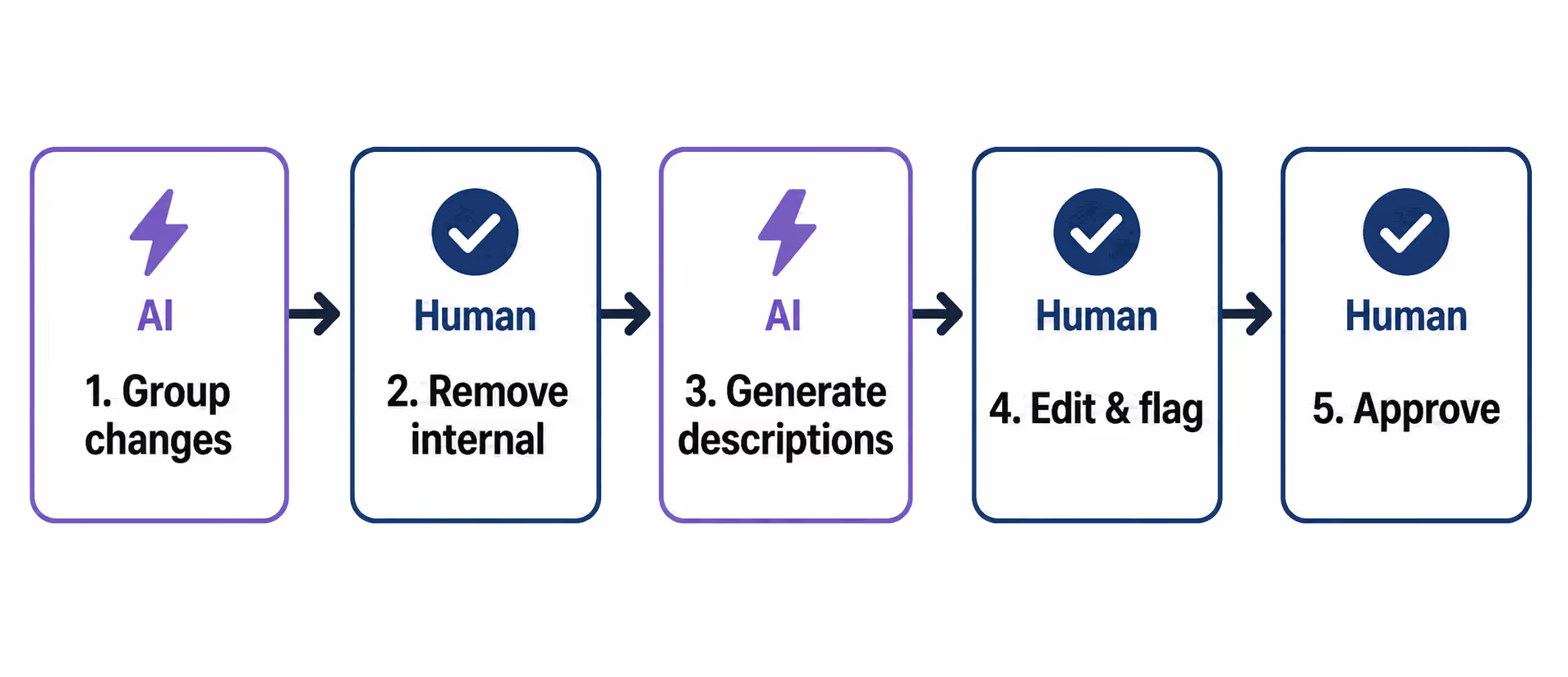
The human review step is not optional. AI-generated changelogs still need verification: breaking changes occasionally get buried, version numbers can drift from reality, and chore entries sometimes survive into user-facing output. The value of the workflow is not that it eliminates errors — it is that it concentrates the human's attention on the decisions that matter, rather than on the mechanical work of extraction and formatting.
The production dimension of release note challenges is the largest category of problems teams face, accounting for nearly half of all reported issues. Automating and standardizing the production process is where the leverage is. The content decisions — what to include, how to describe it, what to flag — remain human.
Anyway. Many teams have already reduced headcount and no longer have a dedicated release notes owner. The one technical writer or engineering lead still doing this work is covering ground that used to take a team. The answer is not to let release notes go stale, or to let breaking changes slip through because there was no time to review the log carefully. The answer is a system that scales with the team's velocity without requiring the team to grow.
Doc Holiday generates release notes, changelogs, and API references directly from engineering workflows — commits, tickets, product specs — and provides the validation structure that helps mitigate hallucination risks and catch missed breaking changes through structured validation. It is the tooling that lets a lean team maintain quality at volume.



