How to Automatically Update Jira Documentation After a Sprint


The sprint board just hit zero. Every ticket is closed, the deployment is live, and the engineering team is already planning the next sprint.
Meanwhile, the support team has no idea what shipped.
This is the normal state of affairs. Sprints end. Documentation doesn't. The gap between the two is not a motivation problem or a communication problem. It is a structural one: the people who know what changed don't want to write the documentation, and the people who write the documentation don't have the context fast enough to do it well.
The fix is to automate the extraction. You pull the data that already lives in Jira, generate the first draft of your release notes, changelog, and internal update digest, and then have a technical writer or product lead validate the output before it ships. You don't ask engineers to write separate summaries. You don't ask technical writers to reconstruct what happened from ticket descriptions written for developers. You take what's already there and turn it into something your support team can actually use.
That's the answer. The rest of this is about how to make it work.
The Tickets Close. The Documentation Doesn't.
Engineers spend just 16% of their time writing code, according to an IDC Survey Spotlight. The rest goes to coordination, clarifying requirements, and switching between tools. Documentation is somewhere in that 84%, and it's the first thing that gets cut when a deadline approaches.
This is not a character flaw. In fast-paced Agile environments, developers deprioritize documentation due to tight deadlines and a focus on delivering working code. When they do write documentation, they write it for themselves. A study of 32,425 release notes across 1,000 GitHub projects found significant discrepancies between what release note producers think is important and what users actually need. Engineers document the implementation. Customers need the outcome.
The technical writer or product manager is left to bridge that gap, usually by chasing down engineers after the sprint to ask what a ticket actually meant. This is slow, error-prone, and doesn't scale.
An empirical study of GitHub repositories found that 47% of release artifacts lacked traceability links to the underlying pull requests or commits. Nearly half of all releases had no clear connection between what was documented and what was shipped. The documentation that does exist is often written from memory, two weeks after the fact, by someone who wasn't in the room when the decision was made.
Gartner reports that 54% of customers experience frustration when new features lack proper documentation. That frustration lands in the support queue, which is where the lag becomes visible as a cost.
Anyway. The data is already in Jira. The question is whether you're using it.
What Jira Already Knows
Almost all existing automated methods for generating release notes rely on the reorganization, summarization, or categorization of non-code artifacts: commit messages, pull requests, and issues. The raw material is already there. The problem is that it's structured for engineers, not for customers or support teams.
To make automation work, you need to structure Jira so the right context is captured at the point of creation, not reconstructed afterward.
The most important change is adding a required custom field for user-facing impact. Call it "Release Note Summary" or "Customer Impact." It's a single text field that the product manager or engineer fills in before closing the ticket. It answers one question: what can someone now do that they couldn't do before, or what problem does this fix? Jira automation can then copy these custom fields into the description or payload used for generating release notes, making them available for downstream drafting.
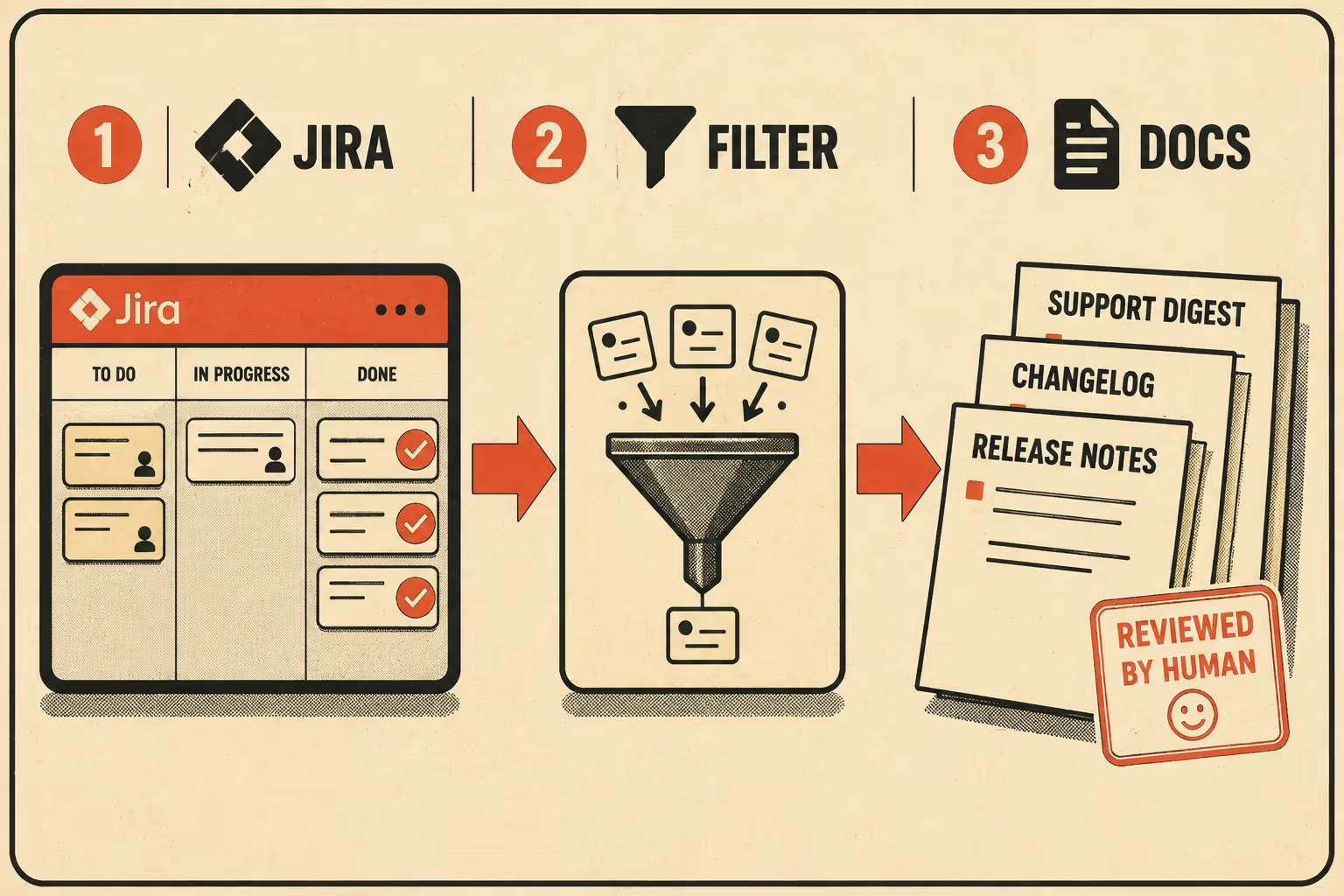
Labels matter too. Use them to categorize the type of change (bug, enhancement, breaking-change) and the audience (customer-facing, internal-only). This is how your automation rules filter out backend refactoring that customers don't need to see. A performance improvement to a database query that users never interact with is not a release note. A label tells the system that.
For teams that want to go further, the Conventional Commits specification provides a lightweight convention on top of commit messages that makes it possible to automatically generate changelogs and determine semantic version bumps. A commit typed as feat: is a feature. A commit typed as fix: is a bug fix. A commit with BREAKING CHANGE: in the footer is something your customers need to know about immediately. The structure is already there if the team uses it.
Once the data is structured, the automation is straightforward. A Jira automation rule triggers when a sprint completes. It queries all closed tickets labeled customer-facing, extracts the "Release Note Summary" field from each, groups them by component, and sends the payload to a documentation tool for drafting. The output is a first draft of your release notes, your changelog, and your internal support digest, generated from the data that already existed in Jira before the sprint ended.
A 2024 practitioner survey found that the key artifacts present in release note contents are issues (29%), pull requests (32%), and commits (19%). All three are in Jira or linked from it. The extraction is the easy part. The hard part is making sure the input data is clean enough to generate output worth reading.
Where the Human Still Matters
Automating the extraction and drafting is not the same as automating the judgment.
Generating comprehensive, accurate, and useful release notes requires a deep understanding of the changes made, the ability to distill complex technical modifications into user-friendly language, and the foresight to anticipate what information will be most valuable to the audience. AI tools are good at translating engineering artifacts into clear information. They are not good at knowing that a particular ticket, while technically customer-facing, describes a fix for a bug that was never publicly acknowledged and probably shouldn't appear in the external changelog.
That call belongs to a human.
The role of the technical writer or product manager in an automated sprint documentation workflow is not to write the documentation from scratch. It's to validate the output, rewrite edge cases, ensure tone consistency, and catch anything that shouldn't be customer-visible. The system does the extraction and the drafting. The human does the review.
This is what scales. You're not asking your technical writer to review 40 tickets and reconstruct what happened. You're asking them to review a draft that already reflects what happened, flag the two tickets that need rewording, and approve the rest. The institutional knowledge stays in the loop. The manual overhead doesn't.
What good automated sprint documentation looks like, in practice: it arrives the day the sprint closes, not two weeks later. It's organized by audience, so the customer-facing release notes don't include the internal refactoring work. It's accurate enough that the support team can use it to answer tickets without opening Jira. And it's consistent enough that readers know what to expect every sprint, because the format doesn't change based on who had time to write it.
The sprint is done. The documentation should be too.
Doc Holiday generates this output directly from Jira workflows, and gives your technical writer or product lead the structure to validate and scale it without manually reviewing every ticket.



